【大模型2609·Python基础·04】数据容器精讲(上):列表List、字符串Str与元组Tuple

专栏导读:容器是处理结构化数据的基石。本篇专注解析序列类型(Sequence Types)的核心设计,深度对比可变序列(列表 List)与不可变序列(字符串 Str、元组 Tuple)。内容包含底层内存模型、切片步长机制、常用内置高频方法及不可变对象的安全性设计。


第5章 Python的容器类型

5.1 容器概述

Python 提供了多种内置的容器类型,用于存储和组织数据。内置的主要容器类型有:列表list、元组tuple、字符串str、集合set、字典dict等,另外Python还在collections模块中提供了更多容器类型,例如:双端队列deque等。

5.1.1 常见容器类型

常见容器类型区别:

类型 示例 可变性 有序性 重复元素 使用场景
列表(list) [1, 2, 3] 可变 有序 允许 有序数据集合,需要修改
集合(set) {1, 2, 3} 可变 无序 不允许 唯一元素集合,集合运算
字典(dict) {'a': 1, 'b': 2} 可变 无序 键唯一 键值对映射,快速查找
字节数组(bytearray) bytearray(b'hello') 可变 有序 允许 需要存储和处理二进制数据
范围(range) range(5) 不可变 有序 允许 表示数字序列,节省内存
字符串(str) 'hello' 不可变 有序 允许 文本处理,字符序列
元组(tuple) (1, 2, 3) 不可变 有序 允许 固定数据集合,字典键
字节串(bytes) b'hello' 不可变 有序 允许 不可变二进制数据
冻结集合(frozenset) frozenset([1, 2, 3]) 不可变 无序 不允许 不可变集合,字典键
1
2
3
4
5
6
7
8
9
10
11
12
13
14
15
16
17
18
19
20
21
22
23
24
25
26
27
28
29
30
31
32
33
34
# ------------------可变容器-----------------------
# 列表
listDemo = [1, 2, 3, 4, 5, 3, 4, 5]
print(f"列表{listDemo}")
listDemo.append(6)
print(f"追加元素6之后列表{listDemo}")
listDemo[0] = 10
print(f"修改[0]为10之后列表{listDemo}")
print()

# 集合
setDemo = {1, 2, 3, 4, 5, 3, 4, 5}
print(f"集合{setDemo}")
setDemo.add(6)
print(f"添加元素6之后集合{setDemo}")
setDemo.remove(3)
print(f"删除元素3之后集合{setDemo}")
print()

# 字典
dictDemo = {"name": "Irene", "age": 18}
print(f"字典{dictDemo}")
dictDemo["sex"] = "female"
print(f"修改字典之后字典{dictDemo}")
del dictDemo["age"]
print(f"删除字典的age之后字典{dictDemo}")
print()

# 字节数组
bytearrayDemo = bytearray(b'hello')
print(f"字节数组{bytearrayDemo}")
bytearrayDemo[0] = 65
print(f"修改字节数组[0]元素之后字节数组{bytearrayDemo}")
print()
1
2
3
4
5
6
7
8
9
10
11
12
13
14
15
16
17
18
19
20
21
22
23
24
25
26
27
28
29
30
31
32
33
# ------------------不可变容器-----------------------
# 范围
rangeDemo = range(1, 10)
print(f"{rangeDemo}遍历", end=":")
for i in rangeDemo:
print(i, end=" ")
print("\n")
# rangeDemo[0]=100 # 不可修改,也没有提供修改元素的方法

# 字符串
stringDemo = "Irene"
print(f"字符串{stringDemo}")
stringDemo = stringDemo.replace('r', 'a'); # 原对象不可修改,返回新对象
print(f"替换字符串r为a之后字符串{stringDemo}")
print()

# 元组
tupleDemo = (1, 2, 3, 4, 5)
print(f"元组{tupleDemo}")
# tupleDemo[0] = 10 # 不可修改,也没有提供修改元素的方法
print()

# 字节
bytesDemo = b'Irene'
print(f"字节串{bytesDemo}")
bytesDemo = bytesDemo.replace(b'r', b'a')
print(f"替换字节串r为a之后字节串{bytesDemo}")
print()

# 冻结集合
frozensetDemo = frozenset([1, 2, 3, 4, 5])
print(f"冻结集合{frozensetDemo}")
# frozensetDemo.add(6) # 冻结集合不可修改,也没有提供修改元素的方法

5.1.2 容器通用基础操作

  • 检查元素x是否为容器中的成员:x in container
  • 获取容器的长度:len(container)
  • 遍历容器:for x in container:
  • 容器:找最大值max(container)、最小值min(container)
  • 容器元素求累加和:sum(container) 要求元素是数值类型
1
2
3
4
5
6
7
8
9
10
11
12
13
14
15
16
17
18
19
20
21
22
23
24
25
26
27
28
"""
1、容器的通用操作:
- 检查成员是否为容器中的元素:x in sequence
- 获取容器的长度:len(sequence)
- 遍历容器:for x in sequence :
- 容器找最大值max(sequence)、最小值min(sequence)
- 容器元素求累加和:sum(container) 要求元素是数值类型
"""
print("-" * 20, "容器之列表list类型", "-" * 20)
nums = [1, 2, 3, 4, 5]
print("nums:", nums)
print("4在列表中吗?", 4 in nums)
print("列表的长度是:", len(nums))
for num in nums:
print(num)
print("列表中的最大值是:", max(nums))
print("列表中的最小值是:", min(nums))
print("元素的累加和是:", sum(nums)) # 要求元素是数值类型

print("-" * 20, "容器之集合set类型", "-" * 20)
words = {"hello", "world", "python","atguigu"}
print("words:", words)
print("hello在集合中吗?", "hello" in words)
print("集合的长度是:", len(words))
for word in words:
print(word)
print("集合中的最大值是:", max(words))
print("集合中的最小值是:", min(words))

5.2 序列类型

说明:序列(sequence)类型是有序的容器,支持索引访问。常见的序列类型包括:列表(List)、字符串(String)、元组(Tuple)等

元素:有序、可重复

5.2.1 序列类型通用的操作

  • 根据索引方式访问序列的元素:例如sequence[0]
  • 通过切片方式访问序列的元素:例如sequence[1:3]
    • [ start : end ],步长为1,复制[start, end)范围的元素。start缺省表示从0开始,end缺省表示到末尾。
    • [start :: step],start是起始下标。步长为step的绝对值。step为正数,表示正序,start缺省表示从0开始。step为负数,表示倒序,start缺省表示从末尾开始。
  • 获取元素x的索引:sequence.index(x)
  • 序列拼接相加:sequence1 + sequence2
  • 序列乘法:sequence1 * n
  • 元素x数量统计:sequence.count(x)
  • 遍历列表元素:x代表元素,i代表元素索引,sequence代表序列
    • for x in sequence
    • for i in range(len(sequence))
    • for i,x in enumerate(sequence)
1
2
3
4
5
6
7
8
9
10
11
12
13
14
15
16
17
18
19
20
21
22
23
24
25
26
27
28
29
30
31
32
33
34
35
words = ["hello", "world", "python","atguigu","ai"]

# 访问元素
# 正序索引:索引从0开始
# 倒序索引:索引从-1开始
# 根据访问单个元素
print("words[0]:", words[0])
print("words[-1]:", words[-1])
# 获取元素索引
print("words.index('atguigu'):", words.index("atguigu"))

# 切片
print("words[1:3]:", words[1:3])
print("words[:3]:", words[:3])
print("words[3:]",words[3:])
print("words[1:-1]",words[1:-1])

# 序列相加,拼接
words = words + [6,7]
print("words + [6,7]:", words)
words = words * 2 # 列表重复2次
print("words * 2:", words)

# 元素数量统计(元素可重复)
print("words.count(5):", words.count(5))

# 遍历
for word in words:
print(word)

for i in range(len(words)):
print(f"第{i+1}个单词{words[i]}")

for i,word in enumerate(words):
print(f"第{i+1}个单词{word}")

5.2.2 列表(有序可变[])

  • 列表是一个可变的集合,是一个元素有序、可重复的序列。
  • 列表使用 [] 定义,数据之间使用 , 分隔。
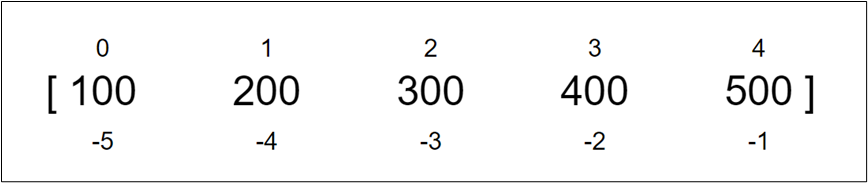
  • 列表中每个元素都有对应的位置值,称为索引或下标,索引值:从左往右从0开始逐个向后递增,从右往左从-1开始逐个向前递减。
  • 列表中元素可以是不同的类型。

image-20251213200511927

1、创建列表

1
2
3
4
5
6
7
8
9
# 创建列表
list_demo1 = [10,20,30,40,50] # []代表列表
print("list_demo1:", list_demo1)
list_demo2 = list(range(10)) # 使用range创建列表
print("list_demo2:", list_demo2)
list_demo3 = list("hello world") # 字符串转列表
print("list_demo3:", list_demo3)
list_demo4 = list() # 空列表
print("list_demo4:", list_demo4)

2、容器、序列通用操作

1
2
3
4
5
6
7
8
9
10
11
12
13
14
15
16
17
18
19
20
21
22
23
24
25
26
27
28
29
30
31
32
33
34
35
36
37
38
39
40
41
42
43
44
45
46
47
48
49
50
51
52
53
54
55
56
57
58
59
60
61
62
63
64
65
66
# 检查成员是否为列表中的元素
listDemo = [10, 20, 30, 40, 50]
print(f"10 in {listDemo}:", 10 in listDemo) # True
print(f"60 in {listDemo}:", 10 in listDemo) # False

# 获取列表长度
print("列表的长度", len(listDemo))

# 访问列表元素
print("listDemo[0]:", listDemo[0]) # 获取索引[0]的元素10
print("listDemo[-2]:", listDemo[-2]) # 获取索引[-2]的元素40

# 列表切片
listDemo = [10, 20, 30, 40, 50]
print(listDemo[:]) # 复制整个列表
print(listDemo[2:]) # 复制索引[2]到末尾的所有元素
print(listDemo[:-2]) # 复制开头到索引[-2](不含)的所有元素
print(listDemo[1:-2]) # 复制索引[1]到索引[-2](不含)的所有元素

print(listDemo[::2]) # 从头开始,步长为2获取元素
print(listDemo[::-2]) # 从尾开始,步长为2倒序获取元素
print(listDemo[1::2]) # 从[1]开始,步长为2获取元素
print(listDemo[-2::-2]) # 从[-2]开始,步长为2倒序获取元素

# 遍历列表
# 方式一:直接遍历元素
listDemo = [10, 20, 30, 40, 50]
print("列表遍历", end=":")
for num in listDemo:
print(num, end=" ")
print()

# 方式二:通过索引遍历元素
listDemo = [10, 20, 30, 40, 50]
print("列表遍历", end=":")
for i in range(len(listDemo)):
print(listDemo[i], end=" ")
print()

# 方式三:使用enumerate()同时获取下标和元素
listDemo = [10, 20, 30, 40, 50]
print("列表遍历", end=":")
for i, num in enumerate(listDemo):
print(f"{i}={num}", end=" ")
print()


# 列表相加/拼接
one = [1, 2, 3]
two = ['a', 'b', 'c']
three = one + two # 列表相加
print(f"{one} + {two} = {three}")
# [1, 2, 3] + ['a', 'b', 'c'] = [1, 2, 3, 'a', 'b', 'c']

# 列表相乘/重复
listDemo1 = [10, 20, 30]
listDemo2 = listDemo1 * 3
print(f"{listDemo1} * 3 = {listDemo2} ")
# [10, 20, 30] * 3 = [10, 20, 30, 10, 20, 30, 10, 20, 30]

# 列表统计
listDemo = [3, 5, 8, 6, 3, 3, 9, 3, 7]
print(f"列表{listDemo}的最大值:", max(listDemo))
print(f"列表{listDemo}的最小值:", min(listDemo))
print(f"列表{listDemo}元素之和:", sum(listDemo)) #只适用于元素是数值类型
print(f"列表{listDemo}中3的数量:", listDemo.count(3))

3、向列表添加元素

1
2
3
4
5
# 列表添加元素
listDemo = [10, 20, 30, 40, 50]
listDemo.append(60) # 末尾追加元素
listDemo.insert(1, 70) # 指定位置插入元素,例如在[1]位置插入70
print(listDemo) # [10, 70, 20, 30, 40, 50, 60]

4、删除列表元素

1
2
3
4
5
6
7
8
9
10
11
12
13
14
15
16
17
18
# 列表删除元素
listDemo = [10, 20, 30, 40, 50, 60, 70, 80, 90, 100]
print(f"删除之前列表:{listDemo}")
# 方式一:指定下标删除元素
del listDemo[1]
print(f"删除[1]元素之后列表:{listDemo}")
# 方式二:通过切片删除元素
del listDemo[1:4]
print(f"删除[1:4]元素之后列表:{listDemo}")
# 方式三:使用remove()方法删除指定元素
listDemo.remove(60)
print(f"删除60元素之后列表:{listDemo}")
# 方式四:使用pop()方法删除指定元素
listDemo.pop(1)
print(f"删除[1]元素之后列表:{listDemo}")
# 列表清空
listDemo.clear()
print(f"清空列表之后列表:{listDemo}")

5、修改列表中的元素

1
2
3
4
5
6
7
8
9
10
11
12
# 列表元素修改
# 方式一:通过下标修改单个元素
listDemo = [10, 20, 30, 40, 50, 60]
print(f"修改之前列表:{listDemo}")
listDemo[0] = 'a'
print(f"替换[0]元素后列表:{listDemo}") # ['a', 20, 30, 40, 50, 60]

# 方式二:通过切片修改多个元素
listDemo[2:4] = ['a', 'b', 'c', 'd']
print(f"替换[2,4)后的列表:{listDemo}") # [10, 20, 'a', 'b', 'c', 'd', 50, 60]


6、列表排序、反转

1
2
3
4
5
6
7
listDemo = [3, 5, 8, 6, 3, 3, 9, 3, 7]
listDemo.reverse()
print(f"列表{listDemo}反转后:", listDemo)
listDemo.sort()
print(f"列表{listDemo}排序后:", listDemo)
listDemo.sort(reverse=True)
print(f"列表{listDemo}倒序排序后:", listDemo)

7、列表嵌套

列表中元素可以为列表。

1
2
3
4
# 列表嵌套
listDemo = [[1, 2, 3], [4, 5, 6], [7, 8, 9]]
for inner_list in listDemo:
print(inner_list)

8、语法糖之一:列表推导式

列表推导式是 Python 中一种简洁创建列表的方式,它将一个可迭代对象(如列表、元组、集合、字符串等)的元素通过某种运算或条件筛选后生成一个新的列表。

Python仅原生支持 4 种推导式 / 表达式:(其他推导式请看后面相关内容)

  • 列表推导式:[表达式 for 元素 in 可迭代对象] → 直接生成列表
  • 集合推导式:{表达式 for 元素 in 可迭代对象} → 直接生成集合
  • 字典推导式:{键:值 for 元素 in 可迭代对象} → 直接生成字典
  • 生成器表达式:(表达式 for 元素 in 可迭代对象) → 生成生成器
1
2
3
4
5
6
7
8
9
10
11
12
13
14
15
16
17
18
# 列表推导式
# (1)基础的列表推导式
# 用range生成1-9的数列,列表推导式将这些数字依次放入列表中
listDemo = [i for i in range(1, 10)]
print(listDemo)

# 用range生成1-9的数列,然后用列表推导式生成1-9的平方
listDemo = [i * i for i in range(1, 10)]
print(listDemo)

# 用range生成0-4的数列,然后对每个数进行平方运算(x**2)
listDemo = [x**2 for x in range(5)]
print(listDemo) # [0, 1, 4, 9, 16]

# 用列表生成一个列表,新列表中的元素是原列表中的每个数平方
listDemo = [1, 2, 3, 4, 5]
listDemo2 = [i * i for i in listDemo]
print(listDemo2)
1
2
3
4
# (2)列表推导式中添加条件
# 用range生成1-9的数列,然后通过条件判断i % 2 == 0筛选出偶数
listDemo = [i for i in range(1, 10) if i % 2 == 0]
print(listDemo) # [2, 4, 6, 8]
1
2
3
4
5
6
7
# (3)包含多个循环的列表推导式
# 使用列表推导式生成所有可能的元素组合对
list1 = [1, 2, 3]
list2 = ["a", "b", "c"]
tuple_list = [(i, j) for i in list1 for j in list2]
print(tuple_list)
# [(1, 'a'), (1, 'b'), (1, 'c'), (2, 'a'), (2, 'b'), (2, 'c'), (3, 'a'), (3, 'b'), (3, 'c')]

1、什么是语法糖

语法糖(Syntactic Sugar)是编程语言中的一种特性,它指的是在不影响语言功能的前提下,为程序员提供更简洁、更易读的语法形式。语法糖本身并不增加语言的功能,而是让代码更容易编写和理解。语法糖的特点:

  • 简化代码:让复杂的操作用更简单的语法表达。
  • 提高可读性:使代码更接近自然语言或逻辑思维。
  • 不改变语义:语法糖只是对底层实现的封装,不会影响程序的实际行为。

2、python中的语法糖有很多,例如:

  • for循环:底层是迭代器,请看后续小节
  • 推导式:底层是产生列表、集合、字典、生成器的代码
  • 装饰器:底层是函数包装,请看后续小节
1
2
3
4
5
6
7
# 普通写法
squares = []
for x in range(10):
squares.append(x ** 2)

# 语法糖写法(列表推导式)
squares = [x ** 2 for x in range(10)]

9、zip函数

zip 函数用于将多个可迭代对象打包成一个迭代器,将对应位置的元素组合成元组。

1
2
3
4
5
6
7
8
9
10
11
12
13
14
15
16
17
18
19
20
21
22
# zip函数
# 基本用法
list1 = [1, 2, 3]
list2 = ['a', 'b', 'c']
result = list(zip(list1, list2))
print(result) # [(1, 'a'), (2, 'b'), (3, 'c')]

# 循环遍历
for i, j in zip(list1, list2):
print(f"{i} = {j}")
# 输出:
# 1 = a
# 2 = b
# 3 = c

# 不同长度的列表
list3 = [1, 2, 3, 4, 5]
list4 = ['a', 'b', 'c']
result2 = list(zip(list3, list4))
print(result2) # [(1, 'a'), (2, 'b'), (3, 'c')]
# 注意:zip会以最短的序列为准

1
2
3
4
5
# 解压操作
zipped = [(1, 'a'), (2, 'b'), (3, 'c')]
numbers, letters = zip(*zipped)
print(numbers) # (1, 2, 3)
print(letters) # ('a', 'b', 'c')

10、常用函数

函数 说明
list.insert(index,x) 在指定位置插入x
list.append(x) 在列表末尾追加x
list1.extend(list2) 在列表1的末尾追加列表2的数据
del list[index] 删除指定位置的数据或切片
list.remove(x) 删除第一次出现的x
list.pop([index]) 删除指定位置的数据,默认为末尾数据
list.clear() 清空列表中元素
list[index] = x 修改指定位置的数据
list1[start:end] = list2 修改列表切片的数据
sorted(list[,reverse=True]) 返回排序后的新列表,可选降序
list.sort([reverse=True]) 对列表就地排序,可选降序
list.reverse() 反转列表中的元素
list.index(x[,start,[,end]]) 返回x在列表中首次出现的位置,可指定起始和结束范围
list.count(x) 返回x的数量
len(list) 返回列表元素个数
max(list) 返回列表中最大值
min(list) 返回列表中最小值
sum(list) 返回列表中所有元素和
list.copy() 拷贝列表
list(x) 将序列转换为列表

5.2.3 字符串(有序不可变)

  • 字符串是不可变的、有序的。
  • 字符串中元素不可修改。
  • 字符串使用单引号、双引号或三重引号定义。
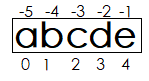
  • 字符串中每个元素都有对应的位置值,称为索引或下标,索引值:从左往右从0开始逐个向后递增,从右往左从-1开始逐个向前递减。

image-20251215221623746

字符串对象不可变,字符串没有append,insert,remove,replace、sort、reverse等操作方法

1、创建字符串

1
2
3
4
5
6
7
8
9
10
11
12
13
14
15
16
17
# 创建字符串
s1 = 'hello' # 字符串可以是单引号
s2 = "hello" # 字符串可以是双引号
# 多行文本可以使用"""
s3 = """
hello
world
"""
# 多行文本可以使用'''
s4 = '''
hello
atguigu
'''
print(s1)
print(s2)
print(s3)
print(s4)

2、容器、序列相同的操作

(1)容器通用操作

  • 检查元素x是否为容器中的成员:x in container
  • 获取容器的长度:len(container)
  • 遍历容器:for x in container:
  • 容器:找最大值max(container)、最小值min(container)
  • 容器元素求累加和:sum(container) 要求元素是数值类型

(2)序列通用操作

  • 访问序列的元素

    • 根据索引方式访问序列的元素:例如sequence[0]
    • 通过切片方式访问序列的元素:例如sequence[1:3]
  • 获取元素x的索引:sequence.index(x)

  • 序列拼接相加:sequence1 + sequence2

  • 序列乘法:sequence1 * n

  • 元素x数量统计:sequence.count(x)

  • 遍历列表元素:x代表元素,i代表元素索引,sequence代表序列

    • for x in sequence
    • for i in range(len(sequence))
    • for i,x in enumerate(sequence)
1
2
3
4
5
6
7
8
9
10
11
12
13
14
15
16
17
18
19
20
21
22
23
24
25
26
27
28
29
30
31
32
33
34
35
36
37
38
39
40
41
42
43
44
45
# 检查成员是否为字符串中的元素
strDemo = "hello"
print(f"l in {strDemo}=", 'l' in strDemo)

# 字符串的长度
strDemo = "hello"
print(f"{strDemo}字符串的长度=",len(strDemo))

# 索引和切片
strDemo = "helloworld"
print(f"{strDemo}字符串的[0]=",strDemo[0])
print(f"{strDemo}字符串的[-1]=",strDemo[-1])
print(f"{strDemo}字符串的[1:5]=",strDemo[1:5])
print(f"{strDemo}字符串的[4:-3]=",strDemo[2:-3])
print(f"{strDemo}字符串的[::2]=",strDemo[::2])
print(f"{strDemo}字符串的[::-1]=",strDemo[::-1])
print(f"l在{strDemo}中的索引=",strDemo.index("l"))

# 遍历
for s in "hello":
print(s, end=", ")
print()

for i,s in enumerate("hello"):
print(f"第{i+1}个字符是{s}")

for i in range(len("hello")):
print(f"第{i+1}个字符是{strDemo[i]}")

# 字符串相加
strDemo = "hello"
print(f"字符串的拼接{strDemo}", end=" + ")
strDemo += "world"
print(f"world=",strDemo)

# 字符串乘法
str1 = "hello"
str2 = str1 * 3
print(f"{str1} * 3 =",str2)

# 字符串的统计
strDemo = "hello"
print(f"{strDemo}字符串的统计=",strDemo.count("l"))
print(f"{strDemo}最大字符=",max(strDemo))
print(f"{strDemo}最小字符=",min(strDemo))

3、原始字符串

所有的字符串按照字面意思处理,没有转义字符。需在字符串前加上r / R。

1
2
3
# 原始字符串
strDemo = r"hello\nworld"
print(strDemo)

4、常用函数

函数 说明
str.replace(old,new[,max]) 把将字符串中的old替换成new,如果指定max,则替换不超过max次
str.split([x][,n]) 按x分隔字符串,默认按任何空白字符串分隔并在结果中丢弃空字符串。可指定最大分隔次数
str.rsplit([x][,n]) 与split()类似,从右边开始分隔
x.join(seq) 以x作为分隔符,将序列中所有的字符串合并为一个新的字符串
str.strip([x]) 截掉字符串两边的空格或指定字符
str.lstrip([x]) 截掉字符串左边的空格或指定字符
str.rstrip([x]) 截掉字符串右边的空格或指定字符
str.removeprefix() 截掉字符串指定前缀
str.removesuffix() 截掉字符串指定后缀
str.upper() 将所有字符转为大写
str.lower() 将所有字符转为小写
str.swapcase() 反转字符串中字母大小写
str.capitalize() 将字符串第一个字母变为大写,其他字母变为小写
str.title() 将字符串每个单词首字母大写
len(str) 返回字符串长度
max(str) 返回字符串中最大值
min(str) 返回字符串中最小值
str.find(x[,start][,end]) 返回字符串中第一个x的索引值,不存在则返回-1,可指定字符串开始结束范围
str.rfind(x[,start][,end]) 与find()类似,从右边开始查找
str.index(x[,start][,end]) 返回字符串中第一个x的索引值,不存在则报错,可指定字符串开始结束范围
str.rindex(x[,start][,end]) 与index()类似,从右边开始查找
str.count(x[,start][,end]) 返回字符串中x的个数,可指定字符串开始结束范围
str.startswith(x[,start][,end]) 检查字符串是否以x开头,可指定字符串开始结束范围
str.endswith(x[,start][,end]) 检查字符串是否以x结尾,可指定字符串开始结束范围
str.isspace() 检查字符串是否非空且只包含空白
(1)字符串替换
1
2
3
4
# 字符串替换
str1 = "hello world"
str2 = str1.replace("world", "python") # 原字符串对象不会改变
print(f"{str1}字符串替换=",str2)
(2)多个字符串连接
1
2
3
4
5
# 多个字符串连接
words = ['hello', 'world', 'python']
separator = '-'
result = separator.join(words)
print(f"使用 '{separator}' 连接 {words} =", result)
(3)字符串中查找子字符串
1
2
3
4
5
6
7
8
9
10
11
12
13
14
15
16
17
18
19
20
21
22
# find() 方法检测字符串中是否包含子字符串,如果包含则返回子字符串开始的索引值,否则返回 -1。
text = "hello world"
substring = "world"
position = text.find(substring)
print(f"{text} 中 {substring} 的位置(从0开始) =", position)

# 如果找不到子字符串,则返回 -1
not_found = text.find("java")
print(f"{text} 中查找 java 返回值 =", not_found)


# index() 方法与 find() 类似,但如果子字符串不在原字符串中会抛出异常 ValueError。
try:
text = "hello world"
substring = "world"
position = text.index(substring)
print(f"'{text}' 中 '{substring}' 的位置(从0开始) =", position)

# 尝试查找不存在的子字符串会引发 ValueError 异常
# text.index("java") # 取消注释此行查看错误信息
except ValueError as e:
print("未找到指定子字符串:", e)
(4)字符串拆分
1
2
3
4
5
6
7
8
9
# split() 方法通过指定分隔符对字符串进行切片,并返回分割后的列表。
sentence = "hello world python"
# 默认情况下,split() 使用空白字符作为分隔符
parts = sentence.split()
print(f"{sentence}按空格分割后得到 =", parts)

# 指定逗号作为分隔符
default_split = "apple,banana,orange".split(',')
print("使用逗号分割 'apple,banana,orange' =", default_split)
(5)去掉首或尾的部分
1
2
3
4
5
6
7
8
9
10
11
12
13
14
15
16
17
18
19
20
21
22
23
24
25
26
27
28
29
30
31
32
33
34
35
36
37
38
# strip() 方法用于移除字符串头尾指定的字符(默认为空格或换行符)
text_with_spaces = " hello world "
stripped_text = text_with_spaces.strip()
print(f"'{text_with_spaces}' 去除首尾空格后 = '{stripped_text}'")

# 指定要去除的字符
text_with_chars = "***hello world***"
stripped_chars = text_with_chars.strip('*')
print(f"'{text_with_chars}' 去除首尾星号后 = '{stripped_chars}'")

# lstrip() 方法用于移除字符串开头指定的字符
text = "___hello world___"
left_stripped = text.lstrip('_')
print(f"'{text}' 去除开头下划线后 = '{left_stripped}'")

# rstrip() 方法用于移除字符串末尾指定的字符
text = "___hello world___"
right_stripped = text.rstrip('_')
print(f"'{text}' 去除末尾下划线后 = '{right_stripped}'")

# removeprefix() 方法用于移除字符串的指定前缀(Python 3.9+)
url = "https://www.example.com"
without_protocol = url.removeprefix('https://')
print(f"'{url}' 移除前缀 'https://' 后 = '{without_protocol}'")

# 如果没有匹配的前缀,则返回原字符串
no_change = url.removeprefix('http://')
print(f"'{url}' 尝试移除前缀 'http://' 后 = '{no_change}'")

# removesuffix() 方法用于移除字符串的指定后缀(Python 3.9+)
filename = "document.pdf"
without_extension = filename.removesuffix('.pdf')
print(f"'{filename}' 移除后缀 '.pdf' 后 = '{without_extension}'")

# 如果没有匹配的后缀,则返回原字符串
no_change = filename.removesuffix('.txt')
print(f"'{filename}' 尝试移除后缀 '.txt' 后 = '{no_change}'")

(6)转大小写
1
2
3
4
5
6
7
8
9
10
11
12
13
14
15
16
17
18
19
20
21
22
23
24
25
26
27
28
29
30
# upper() 方法将字符串中的所有小写字母转换为大写字母
text = "hello world"
upper_text = text.upper()
print(f"'{text}' 转换为大写 = '{upper_text}'")

# lower() 方法将字符串中的所有大写字母转换为小写字母
text = "HELLO WORLD"
lower_text = text.lower()
print(f"'{text}' 转换为小写 = '{lower_text}'")

# swapcase() 方法将字符串中的大写字母转换为小写,小写字母转换为大写
text = "Hello World"
swapped_text = text.swapcase()
print(f"'{text}' 大小写互换 = '{swapped_text}'")

# capitalize() 方法将字符串的第一个字符转换为大写,其余字符转换为小写
text = "hello world"
capitalized_text = text.capitalize()
print(f"'{text}' 首字母大写 = '{capitalized_text}'")

# title() 方法将字符串中每个单词的首字母转换为大写
text = "hello world python"
title_text = text.title()
print(f"'{text}' 每个单词首字母大写 = '{title_text}'")

# casefold() 方法类似于 lower(),但更加强大,适用于多语言环境
text = "HELLO WORLD"
casefolded_text = text.casefold()
print(f"'{text}' casefold 转换 = '{casefolded_text}'")

5、其他函数

函数 说明
str.center(width[,x]) 返回长度为width且居中的字符串,空白使用x填充,默认为空格
str.ljust(width[,x]) 返回长度为width且左对齐的字符串,空白使用x填充,默认为空格
str.rjust(width[,x]) 返回长度为width且右对齐的字符串,空白使用x填充,默认为空格
str.zfill(width) 返回长度为width且右对齐的字符串,空白使用0填充
str.splitlines([keepends]) 按行分隔字符串,返回每行字符串组成的列表,可选是否保留换行符
str.partition(x) 使用x将字符串分隔为3部分,如果分隔后不足3部分或字符串中没有x则以空白填充
str.rpartition(x) 与partition()类似,从右边开始分隔
str.encode(encoding=’UTF-8’,errors=’strict’) 对字符串使用指定格式编码,并指定错误处理方案
str.expandtabs([tabsize]) 将字符串中\t转化为空格,可指定每个\t空格数
str.format_map(dict) 使用字典等映射关系数据来格式化字符串
str.isalnum() 检查字符串是否非空且只包含字母(英文字母+汉字)和数字
str.isalpha() 检查字符串是否非空且只包含字母(英文字母+汉字)
str.isascii() 检查字符串是否只包含ASCII字符,空字符串也是ASCII
str.isdecimal() 检查字符串是否非空且只包含十进制字符
str.isdigit() 检查字符串是否非空且只包含数字
str.isidentifier() 检查字符串是否是有效的标识符
str.isupper() 检查字符串中是否包含至少一个区分大小写的字符,且所有这些(区分大小写的)字符都是大写
str.islower() 检查字符串中是否包含至少一个区分大小写的字符,且所有这些(区分大小写的)字符都是小写
str.isnumeric() 检查字符串是否非空且只包含数值字符
str.isprintable() 检查字符串是否可打印
str.istitle() 检查字符串是否非空且符合title格式
str.maketrans(str1,str2[,str3]) 生成翻译表供translate()使用。如果只传一个参数,它必须是将Unicode序号(整数)或字符映射到Unicode序号、字符串或None的字典。然后,字符键将转换为序数。如果传两个参数,需要str1和str2为等长的字符串,并且在生成的字典中,str1中的每个字符都将映射到str2中相同位置的字符。如果有第三个参数,它必须是一个字符串,其字符将在结果中映射到None
str.translate() 使用给定的翻译表替换字符串中的每个字符
(1)字符串填充
1
2
3
4
5
6
7
8
9
10
11
12
13
14
15
16
17
18
19
20
21
22
23
24
25
26
27
28
29
30
31
32
33
34
35
36
# center() 方法返回一个指定宽度并居中对齐的字符串,两侧使用指定字符填充
text = "hello"
centered_text = text.center(15, '*')
print(f"'{text}' 居中对齐(宽度15,填充*) = '{centered_text}'")

# 使用默认空格填充
centered_default = text.center(15)
print(f"'{text}' 居中对齐(宽度15,默认填充) = '{centered_default}'")

# ljust() 方法返回一个指定宽度并左对齐的字符串,右侧使用指定字符填充
text = "hello"
left_justified = text.ljust(15, '-')
print(f"'{text}' 左对齐(宽度15,填充-) = '{left_justified}'")

# 使用默认空格填充
left_default = text.ljust(15)
print(f"'{text}' 左对齐(宽度15,默认填充) = '{left_default}'")

# rjust() 方法返回一个指定宽度并右对齐的字符串,左侧使用指定字符填充
text = "hello"
right_justified = text.rjust(15, '.')
print(f"'{text}' 右对齐(宽度15,填充.) = '{right_justified}'")

# 使用默认空格填充
right_default = text.rjust(15)
print(f"'{text}' 右对齐(宽度15,默认填充) = '{right_default}'")

# zfill() 方法返回指定长度的字符串,原字符串右对齐,前面填充0
number = "42"
zero_filled = number.zfill(8)
print(f"'{number}' 用0填充到长度8 = '{zero_filled}'")

# 对于负数,负号会在0之前
negative_number = "-42"
negative_zero_filled = negative_number.zfill(8)
print(f"'{negative_number}' 用0填充到长度8 = '{negative_zero_filled}'")
(2)字符串分割
1
2
3
4
5
6
7
8
9
10
11
12
13
14
15
16
17
18
19
20
21
22
23
24
25
26
27
28
29
30
31
32
# splitlines() 方法按照行('\r', '\n', '\r\n')分割字符串,返回包含各行的列表
multiline_text = """第一行
第二行
第三行"""

lines = multiline_text.splitlines()
print(f"原始多行文本:\n{multiline_text}")
print(f"splitlines() 分割结果 = {lines}")

# keepends=True 保留换行符
lines_with_endings = multiline_text.splitlines(True)
print(f"splitlines(True) 分割结果 = {lines_with_endings}")

# partition() 方法从左边开始查找分隔符,将字符串分割成三部分:分隔符前、分隔符、分隔符后
text = "hello-world-python"
partition_result = text.partition('-')
print(f"'{text}' 以 '-' 分割 = {partition_result}")

# 如果找不到分隔符,则返回 (原字符串, '', '')
no_separator = "helloworld"
partition_no_match = no_separator.partition('-')
print(f"'{no_separator}' 以 '-' 分割 = {partition_no_match}")

# rpartition() 方法从右边开始查找分隔符,将字符串分割成三部分:分隔符前、分隔符、分隔符后
text = "hello-world-python"
rpartition_result = text.rpartition('-')
print(f"'{text}' 从右以 '-' 分割 = {rpartition_result}")

# 如果找不到分隔符,则返回 ('', '', 原字符串)
no_separator = "helloworld"
rpartition_no_match = no_separator.rpartition('-')
print(f"'{no_separator}' 从右以 '-' 分割 = {rpartition_no_match}")
(3)字符串格式化
1
2
3
4
5
6
7
8
9
10
11
12
13
# format_map() 方法使用字典作为参数来格式化字符串
template = "姓名: {name}, 年龄: {age}, 城市: {city}"
data = {"name": "张三", "age": 25, "city": "北京"}
formatted_text = template.format_map(data)
print(f"模板字符串: {template}")
print(f"字典数据: {data}")
print(f"format_map 格式化结果: {formatted_text}")

# 与 format() 的区别:format_map 直接接受字典
another_template = "课程: {course}, 成绩: {score}"
course_data = {"course": "Python", "score": 95}
result = another_template.format_map(course_data)
print(f"课程信息格式化: {result}")
(5)字符串翻译
1
2
3
4
5
6
7
8
9
10
11
12
13
14
15
16
17
18
19
20
21
22
23
24
25
26
27
28
29
30
31
32
# maketrans() 方法创建字符映射表,用于字符替换
# translate() 方法根据转换表转换字符串中的字符
# 通常与 maketrans() 方法配合使用
# 单个字典参数版本
translation_dict = {'h': 'H', 'l': 'L', 'o': 'O'}
dict_table = str.maketrans(translation_dict)
simple_text = "hello"
dict_translated = simple_text.translate(dict_table)
print(f"\n原文本: {simple_text}")
print(f"字典映射: {translation_dict}")
print(f"翻译后: {dict_translated}")

# 两个参数版本:str1 中的字符映射到 str2 中对应位置的字符
str1 = "abc"
str2 = "123"
translation_table = str.maketrans(str1, str2)
original_text = "bacadb"
translated_text = original_text.translate(translation_table)
print(f"原文本: {original_text}")
print(f"映射规则: {str1} -> {str2}")
print(f"翻译后: {translated_text}")

# 三个参数版本:第三个参数是要删除的字符
str1 = "aeiou"
str2 = "AEIOU"
str3 = ","
remove_translation = str.maketrans(str1, str2, str3)
text_with_spaces = "hello,world"
result_with_removal = text_with_spaces.translate(remove_translation)
print(f"\n原文本: '{text_with_spaces}'")
print(f"映射规则: 小写元音->大写元音, 删除,")
print(f"翻译后: '{result_with_removal}'")

5.2.4 元组(有序不可变())

  • 元组(tuple)是一个不可变的、有序的元素集合。
  • 不能对元组中的元素进行修改操作。
  • 元组使用 () 定义,数据之间使用,分隔。
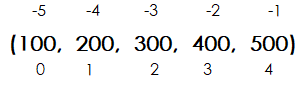
  • 元组中每个元素都有对应的位置值,称为索引或下标,索引值:从左往右从0开始逐个向后递增,从右往左从-1开始逐个向前递减。
  • 元组中元素可以是不同的类型。
  • 元组的使用方式与列表类似。

image-20251216000148019

1、创建元组

1
2
3
4
5
6
7
8
9
10
11
12
13
14
# 创建元组
tuple_demo1 = (10,20,30,40,50)
print("tuple_demo1:", tuple_demo1)
tuple_demo2 = tuple(range(10)) # 使用range创建元组
print("tuple_demo2:", tuple_demo2)
tuple_demo3 = tuple("hello world") # 字符串转元组
print("tuple_demo3:", tuple_demo3)
tuple_demo4 = tuple() # 空元组
print("tuple_demo4:", tuple_demo4)
tuple_demo5 = (10,) # 元组中只有一个元素时,必须用逗号隔开
print("tuple_demo5:", tuple_demo5)
# (x for x in range(10))得到的是一个生成器对象,而不是一个元组对象,所以需要用tuple()函数将其转换为元组对象。
tuple_demo6 = tuple(x for x in range(10))
print("tuple_demo6:",tuple_demo6)

2、容器、序列类型相同的操作

  • (1)容器通用操作

    • 检查元素x是否为容器中的成员:x in container
    • 获取容器的长度:len(container)
    • 遍历容器:for x in container:
    • 容器:找最大值max(container)、最小值min(container)

    (2)序列通用操作

    • 访问序列的元素

      • 根据索引方式访问序列的元素:例如sequence[0]
      • 通过切片方式访问序列的元素:例如sequence[1:3]
    • 获取元素x的索引:sequence.index(x)

    • 序列拼接相加:sequence1 + sequence2

    • 序列乘法:sequence1 * n

    • 元素x数量统计:sequence.count(x)

    • 遍历列表元素:x代表元素,i代表元素索引,sequence代表序列

      • for x in sequence
      • for i in range(len(sequence))
      • for i,x in enumerate(sequence)
1
2
3
4
5
6
7
8
9
10
11
12
13
14
15
16
17
18
19
20
21
22
23
24
25
26
27
28
29
30
31
32
33
34
35
36
37
38
39
40
41
42
43
# 检查成员是否为元组中的元素
tupleDemo = (10, 20, 30, 40, 50)
print(f"10 in {tupleDemo}:", 10 in tupleDemo)

# 获取元组长度
tupleDemo = (10, 20, 30, 40, 50)
print("元组的长度", len(tupleDemo))

# 访问元组元素
# 根据索引方式访问元组的元素
tupleDemo = (10, 20, 30, 40, 50)
print(f"tupleDemo[0]:", tupleDemo[0])
print(f"tupleDemo[-2]:", tupleDemo[-2])

# 通过切片方式访问元组的元素
tupleDemo = (10, 20, 30, 40, 50)
print(tupleDemo[:])
print(tupleDemo[2:])

# 遍历元组
tupleDemo = (10, 20, 30, 40, 50)
for num in tupleDemo:
print(num, end=" ")
print()

# 元组拼接相加
tupleDemo1 = (10, 20, 30)
tupleDemo2 = (40, 50, 60)
tupleDemo3 = tupleDemo1 + tupleDemo2
print(tupleDemo3)

# 元组乘法
tupleDemo1 = (10, 20, 30)
tupleDemo2 = tupleDemo1 * 3
print(tupleDemo2)

# 元组找最大值max、最小值min、元素数量统计count
tupleDemo = (10, 20, 30, 40, 30, 60)
print(f"元组{tupleDemo}的最大值:", max(tupleDemo))
print(f"元组{tupleDemo}的最小值:", min(tupleDemo))
print(f"元组{tupleDemo}的总和:", sum(tupleDemo))
print(f"元组{tupleDemo}元素数量统计:", tupleDemo.count(30))

3、元组不可变

1
2
3
4
5
6
7
8
9
10
11
12
13
14
15
16
17
18
19
20
21
# --------------元组不可变-------------------
tupleDemo1 = (1, 2, 3)
print(id(tupleDemo1))
tupleDemo2 = (4, 5, 6)
tupleDemo1 += tupleDemo2
print(id(tupleDemo1))

# 列表可变
listDemo1 = [10, 20, 30, 40, 50, 60]
print(id(listDemo1))
listDemo2 = [10,20]
listDemo1 += listDemo2
print(id(listDemo1))

# 如果元组中元素是可变数据类型,其嵌套项可以被修改。
tupleDemo = ([1, 2], [3, 4])
print(id(tupleDemo), tupleDemo)
tupleDemo[0][0] = 10
print(id(tupleDemo), tupleDemo)
tupleDemo[0].append(20)
print(id(tupleDemo), tupleDemo)